

If you’ve ever bought a deal on AppSumo, you might wonder what happens if the product isn’t what you expected. Can you get your money back?
Understanding AppSumo’s refund rules is crucial before making a purchase. You want to know exactly how their refund process works, what to expect, and how to avoid surprises. We break down the AppSumo refund policy in simple terms. By the end, you’ll feel confident about when and how you can request a refund—saving you time, stress, and money.
Keep reading to learn everything you need to know about AppSumo’s refund rules.

Credit: www.youtube.com
Appsumo Refund Policy
AppSumo offers a clear refund policy designed to protect buyers. It allows users to request refunds under certain conditions. Understanding these rules helps avoid confusion and ensures smooth transactions.
The policy explains which purchases qualify for refunds and the time frame to act. Knowing these details saves time and effort. Below are key points about AppSumo’s refund policy.
Eligibility Criteria
Refunds apply only to purchases made directly from AppSumo. Buyers must contact AppSumo support to start the refund process. Digital products with defects or issues are eligible for refunds. Products downloaded or used extensively might not qualify. AppSumo reviews each request case by case.
Items Covered
Refunds cover software deals, apps, and digital tools sold on the platform. Physical products are generally not eligible. Some lifetime deals have special refund rules. Apps from third-party sellers follow their own refund policies. Always check product details before purchase.
Time Limits
Most refunds must be requested within 60 days of purchase. Some deals have shorter or longer refund windows. Requests after the deadline are usually denied. Early requests improve chances of approval. Keep purchase receipts and communication records for reference.
Credit: appsumo.com
Initiating A Refund
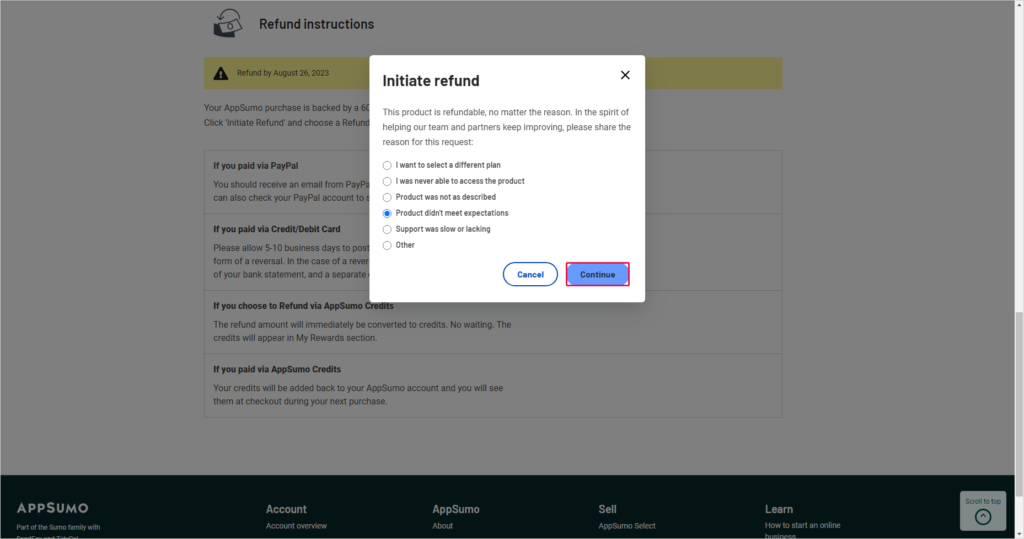
Starting a refund request on AppSumo is straightforward but requires following certain steps. Knowing how to initiate a refund helps avoid delays. This section explains the process clearly and simply.
How To Request
Log into your AppSumo account first. Go to your purchase history. Find the product you want to refund. Click the refund button next to it. Provide a reason for your refund request. Submit the form to start the refund process. You can also contact AppSumo support directly if needed.
Required Information
Prepare your order ID or purchase receipt. Have your payment method details ready. Write a clear explanation for your refund. Include any issues or problems with the product. Keep your contact email up to date. Providing complete information speeds up your refund.
Refund Process Explained
Understanding the refund process on AppSumo helps you know what to expect after requesting a refund. The process involves several steps from the merchant to your bank. Each step plays a key role in making sure your money returns safely.
Merchant Role
The merchant starts the refund by approving your request. They send the refund details to their bank. This step is crucial because the refund cannot move forward without merchant approval.
Payment Processor Involvement
The payment processor acts as a middleman. It receives the refund request from the merchant’s bank. Then, it forwards the request to the card network for routing to your bank.
Card Network Routing
Card networks like Visa or Mastercard route the refund. They send the refund information to your card issuer bank. This routing ensures the refund reaches the correct bank account.
Bank Authorization
Your bank reviews the refund request. It places a pending hold on the refund amount. This hold may appear quickly on your account as pending credit.
Final Credit To Account
Once authorized, the bank credits your account. The credit may take days or a billing cycle to show. After this, the refund process is complete, and your money is back.
Credit: takeofujii.net
Factors Affecting Refund Timing
Refund timing on AppSumo depends on several key factors. These influence how fast the money returns to your account. Understanding these can help set the right expectations after requesting a refund.
Each step in the refund chain adds time. It starts from how you paid, moves through networks, banks, and the merchant’s actions. Let’s break down these factors to explain the refund timing better.
Payment Methods
The type of payment used affects refund speed. Cash refunds are usually instant. Debit cards or direct bank transfers process faster than credit cards.
Credit card refunds can take longer because of extra verification steps. PayPal and other online wallets have their own rules and timing.
Card Networks
Different card networks handle refunds differently. Visa, Mastercard, and American Express have varying processing speeds.
Some networks settle transactions faster than others. This can add a few extra days or even a week to the refund time.
Bank Processing Times
Banks add their own delays to refunds. After the network approves, your bank must post the refund to your account.
This process depends on bank policies and workload. Some banks credit refunds quickly, while others may take several days.
Merchant Response Speed
The merchant’s speed in initiating the refund is crucial. If the merchant delays the request, the whole process slows down.
AppSumo usually processes refunds quickly. But any delay from their side adds to the total waiting time.
What Happens After Refund Request
After you submit a refund request on AppSumo, several steps take place behind the scenes. Understanding what happens next helps set clear expectations. The process involves the payment system, AppSumo, and your bank or card provider. Each party plays a role in completing the refund. The time it takes varies based on these steps and your payment method.
Pending Transactions
Once AppSumo approves your refund, your bank may show a pending transaction. This means the refund is being processed but not yet finalized. The pending status can last from a few hours to several days. It shows as a temporary credit or hold on your account. During this time, the original charge remains on your statement.
Account Credits
After the pending phase, your bank credits your account with the refund amount. For credit cards, this credit lowers your balance. The original charge stays on your statement but is offset by the refund. With debit cards or direct payments, the money returns to your bank balance. The full credit may take a few days to appear.
Tracking Refund Status
You can track your refund status through your bank or card issuer. Many banks offer online tools or apps to check pending and completed refunds. AppSumo may also send email updates about your refund. Keep your payment reference number handy for quick tracking. Contact your bank if you see delays beyond the expected time frame.
Refunds For App Purchases
Refunds for app purchases on AppSumo follow specific rules based on the platform used. Understanding these rules helps you know how to request and receive refunds smoothly. The refund process varies between Apple App Store and Google Play Store purchases. Each platform has its own refund policies and procedures.
Apple App Store Process
To get a refund for an app bought on the Apple App Store, you must visit Apple’s official website. Use the “Report a Problem” page to submit your refund request. Apple reviews the request and decides if it qualifies for a refund. Refunds usually appear in your original payment method within a few days. Note that Apple controls the refund, not AppSumo.
Google Play Store Process
Google Play Store refunds require you to go through Google’s refund system. You can request a refund directly from the app’s page in the Google Play Store. Google allows refunds within 48 hours of purchase automatically. After that, you need to fill out a form and wait for approval. Google handles the refund and credits your payment method.
Common Refund Reasons
Refunds are often granted for technical issues or wrong purchases. If the app does not work as promised, you can ask for a refund. Accidental purchases or duplicate payments also qualify. Sometimes, if the app is removed or unavailable, refunds may be possible. Each case is reviewed individually by the platform.
Subscription Cancellations
For app subscriptions, canceling stops future charges but does not always refund past payments. Apple and Google both allow cancellation anytime. Refunds for subscriptions depend on the platform’s policy and timing of the request. Check your subscription status regularly to avoid unwanted charges.
Refund Limitations
Refunds have limits based on time and reason. Both Apple and Google set strict time frames to request refunds. Not all refund requests will be approved. Some purchases, like in-app items, may be non-refundable. Always read the platform’s refund policy before buying apps on AppSumo.
Tips For Hassle-free Returns
Returning products or requesting refunds on AppSumo can be simple. Following some key tips helps avoid delays and confusion. Clear steps make the refund process smooth and stress-free. These tips focus on keeping records, acting fast, communicating well, and following rules exactly.
Keep Purchase Records
Save all receipts and confirmation emails from AppSumo. Screenshots of your purchase page also help. These documents prove your transaction. They speed up refund requests and avoid disputes. Keep them organized and easy to find.
Act Quickly
Start your refund request soon after purchase. AppSumo has time limits for returns. Missing deadlines can void your refund chance. Early action shows you respect their policies. This reduces back-and-forth and speeds up approval.
Communicate Clearly
Use clear and polite language in messages. State your problem and what you want plainly. Attach proof like screenshots if possible. Avoid vague or emotional statements. Clear communication helps support understand your case fast.
Follow Platform Guidelines
Read AppSumo’s refund rules before requesting a return. Follow their steps exactly as described. Use the official refund form or contact method. Skipping steps or using wrong channels delays your request. Compliance ensures smooth processing by the support team.
Frequently Asked Questions
What Is The Refund Policy For Appsumo?
AppSumo offers a 60-day refund policy on most deals. Request refunds through their support within this period. Digital products must be unused. Refunds process via the original payment method and may take several days to reflect. Always check specific deal terms for exceptions.
How Does The Refund Process Work?
To get a refund, request it from the merchant first. They contact their bank, which routes the refund through payment networks to your bank. Your bank credits your account after processing, which can take several days. Refund speed depends on payment method, merchant, and bank processing times.
Can You Get Your Money Back From An App Purchase?
Yes, you can get a refund for app purchases through Apple App Store or Google Play. Request it quickly via their refund portals. Approval depends on their policies and purchase timing. Refunds usually return to your original payment method within days.
Check platform-specific guidelines for exact steps.
How To Make Money With Appsumo?
Make money with AppSumo by promoting deals as an affiliate, earning commissions on sales through your referral links.
Conclusion
Understanding AppSumo’s refund rules helps you avoid surprises. Always check the refund window and policy details before buying. Act quickly if you want to request a refund. Keep track of your refund status through your payment method. Patience matters, as processing times vary by bank and card network.
Knowing these facts lets you handle refunds with confidence. Stay informed to make smart purchase decisions on AppSumo.